


Bookkeeping Basics: The Complete Beginner’s Guide for UK Small Businesses
Learn how bookkeeping works, why it matters, and how to keep accurate records with or without accounting software.
Bookkeeping is the process of recording and organising the financial transactions of a business. It includes tracking money coming in and going out, checking bank transactions, and keeping the records needed for accounts and tax returns.
Understanding the basics of bookkeeping helps you keep accurate records and know where your business stands financially. This guide explains the main bookkeeping tasks, the records you need to keep and the different ways you can manage your bookkeeping.
Disclosure: This content may contain affiliate links, which means if you click on them, I may get a commission (without any extra cost to you).
At a Glance
- Bookkeeping basics are the recording of income and expenses of a business.
- Regular tasks include recording sales and expenses, keeping invoices and receipts, and reconciling the bank account.
- Accurate records help you see how much the business is owed, what it owes and how much money is available.
- You can use spreadsheets or accounting software to keep bookkeeping records.
- Up-to-date bookkeeping makes it easier to prepare accounts, tax returns and other financial information.
- A downloadable bookkeeping PDF checklist
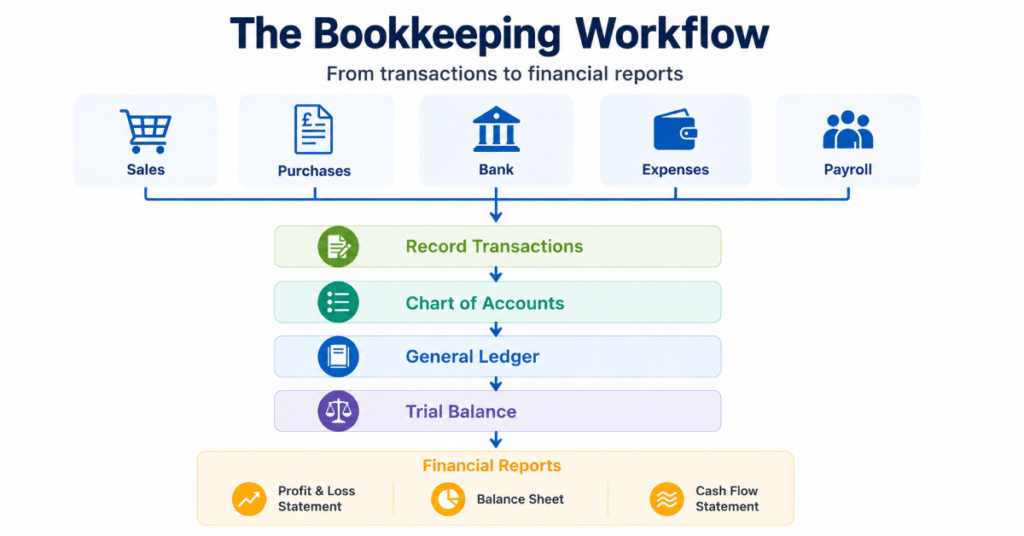
What Is Bookkeeping?
Bookkeeping is the process of recording and organising your business’s financial transactions. This includes everything from recording sales and expenses to reconciling your bank account and preparing the information needed for tax returns and financial reports.
Every business needs to keep financial records, whether you are a sole trader, landlord or limited company. These records show the money coming into and going out of the business and provide the information needed to prepare accounts and meet HMRC requirements.
You can complete bookkeeping using an Excel spreadsheet or accounting software such as Xero, QuickBooks, or Sage. Accounting software can save time by importing bank transactions and helping match payments, while a spreadsheet may suit a smaller business with simple records.
Whichever method you use, the bookkeeping principles are the same. If you’re unfamiliar with some of the bookkeeping terms, our glossary explains them in plain English.
Remember: Bookkeeping records your day-to-day financial transactions. Accounting uses those records to prepare reports, calculate tax and analyse how the business is performing.

Why Is Bookkeeping Important?
Keeping your bookkeeping up to date gives you a clear picture of the money coming into and going out of your business. You can see what you have earned, what you have spent, who owes you money and what bills still need to be paid.
Poor records can lead to missed expenses, unpaid invoices and unexpected tax bills. Regular bookkeeping also means that your financial information is ready when you need to complete a Self Assessment tax return, prepare VAT returns or send information to your accountant.
As your business grows, your bookkeeping records can also help you compare income and expenses over time, monitor cash flow and identify which areas of the business are performing well.
Good bookkeeping helps you:
- understand whether your business is making a profit
- keep track of money coming in and going out
- see which customers still owe you money
- monitor cash flow
- prepare VAT and tax returns
- record and claim allowable business expenses
- identify potential problems earlier
Tip: Spending a few minutes each week updating your records is usually much easier than trying to catch up several months of records at the end of the year.
The Bookkeeping Process
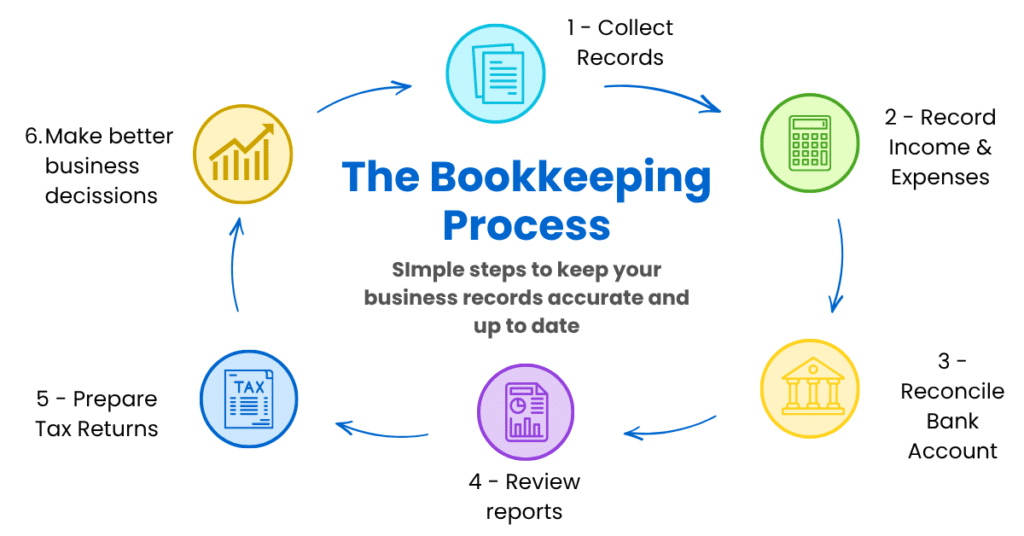
The bookkeeping process involves recording your business transactions and checking that the records are complete and accurate. Whether you use a spreadsheet or accounting software, the basic process is similar.
1. Collect your documents
Collect all the source documents and information that support the business transactions, including:
- sales invoices
- purchase invoices
- receipts
- bank statements
- credit card statements
- payroll records
- mileage logs
If you use accounting software, you may import some information automatically through a bank feed or other connected services.
2. Record Transactions
Record the money coming into and going out of the business. Depending on your bookkeeping system, you might use:
- Excel cash book
- Bookkeeping software
- Manual ledger
Allocate transactions to the appropriate category or account. In a double-entry bookkeeping system, these accounts make up the chart of accounts.
3. Reconcile Bank Account
Compare your records with your bank statement to make sure they match. This helps you identify:
- Missing transactions
- Duplicated entries
- Other errors
Reconciling the bank regularly helps ensure that the balance in your bookkeeping records agrees with the bank.
What Happens Next?
Once the transactions are recorded and checked, you can use the bookkeeping records to prepare financial reports and provide figures for tax returns.
Depending on the type of business, these may include a Profit and Loss Statement, Balance Sheet, VAT return, Self Assessment tax return or Corporation Tax return.
The reports can also help you monitor income, expenses and cash flow and compare how the business is performing over time.
Remember: The bookkeeping process is continuous. As new income and expenses occur, you repeat these steps throughout the year to keep your financial data accurate and current.
The following sections explain each stage in more detail, helping you understand what records to keep, how transactions are recorded and how bookkeeping information is turned into financial reports.
What Records Should You Keep?
Businesses need to keep records of their income, expenses and other financial transactions. You should also keep the documents that support these transactions, such as invoices and receipts.
Typical records and documents include:
- sales invoices
- purchase invoices
- receipts
- bank and credit card statements
- mileage records
- payroll records, if you employ staff
- VAT records, if you are VAT registered
- loan agreements and finance documents
You can store records digitally, and accounting software can help by attaching invoices and receipts directly to transactions. Whatever method you use, make sure your records are complete and easy to find if you or HMRC need to refer to them.
Bookkeeping Example
Imagine you have started a gardening business. During your first week, you complete several jobs and pay some business expenses.
| Transaction | Money In | Money Out |
|---|---|---|
| Customer payments | £850 | |
| Mileage Claimed | £65 | |
| Gardening tools | £180 | |
| Insurance | £120 |
Your bookkeeping records show:
- Total income: £850
- Total expenses: £365
- Profit before tax: £485
This simple example shows how bookkeeping brings your income and expenses together so you can see whether the business has made a profit.
As you record transactions throughout the year, you build the information needed to prepare your accounts and tax return. You can also use the figures to check income, expenses and cash flow.
For more examples, see our bookkeeping examples.
Example: If you forget to record your mileage claim, your profit will appear higher than it really is. This could mean paying more tax than necessary and making decisions based on incorrect financial information.
Find out what records you need and how to calculate your claim in our guide to claiming business mileage, including free templates.
Bookkeeping vs Accounting
Bookkeeping and accounting are closely related, but they have different roles.
Bookkeeping focuses on recording the day-to-day financial transactions of a business. Tasks include recording sales and purchases, entering expenses and reconciling bank accounts.
Accounting uses the bookkeeping records to prepare financial statements and tax returns, analyse business performance and provide financial advice.
Accurate bookkeeping gives an accountant reliable figures to work with when preparing accounts and reviewing the finances of a business.
Bookkeeping and Accounting Compared
| Bookkeeping | Accounting |
|---|---|
| Records daily transactions | Analyses and interprets financial information |
| Maintains accurate records | Prepares statements and tax returns |
| Reconciles bank accounts | Reviews business performance |
| Organises receipts and invoices | Advises on budgeting, tax planning and business growth |
| Produces information for accountants | Uses bookkeeping records to support business decisions |


In simple terms:
Bookkeeping is the process of accurately recording financial data.
Accounting interprets, analyses, and uses that data to guide your business.
Single Entry vs Double Entry Bookkeeping
Businesses can use single entry bookkeeping or double entry bookkeeping to record their financial transactions.
Single entry can work well for sole traders and small businesses with simple bookkeeping needs. Double entry records more information about each transaction and forms the basis of most accounting software.
Single Entry Bookkeeping
Single entry bookkeeping records transactions in a simple cash book or spreadsheet, usually by recording money received and money paid out.
It suits sole traders and small businesses with simple finances that don’t need a full double-entry accounting system.
Advantages of single entry bookkeeping:
- Easy to learn and maintain
- Ideal for simple bookkeeping
- Works well with an Excel cash book
- Requires less knowledge
However, single entry provides less financial information and doesn’t include the checks built into a double-entry system.
Double Entry Bookkeeping
Double entry bookkeeping records each transaction in at least two accounts. Every debit has a corresponding credit, which keeps the accounts in balance.
Accounting software handles much of the double entry automatically. For example, when you enter a sales invoice or record an expense, the software posts the transaction to the relevant accounts.
Advantages of double entry bookkeeping:
- provides more detailed financial records
- helps identify some bookkeeping errors
- supports financial reports such as the Profit and Loss Statement and Balance Sheet
- tracks assets, liabilities, income and expenses
Double entry suits businesses that need more detailed financial records and forms the basis of most accounting systems.
Which method should you use?
If you’re a sole trader or run a business with simple transactions, an Excel cash book may provide everything you need. As your business grows, you may find accounting software useful for features such as bank feeds, invoicing, VAT and financial reports.
Most accounting software uses double entry bookkeeping behind the scenes, so you can benefit from a full accounting system without entering every debit and credit manually.
Good to know: You don’t need to understand debits and credits to use most accounting software. When you enter an invoice, expense or payment, the software creates the corresponding bookkeeping entries.
Cash Accounting vs Accrual Basis Bookkeeping
Businesses can record income and expenses using either the cash basis or accrual accounting.
- Cash basis records income when you receive payment and expenses when you pay them.
- Accrual basis records income and expenses when they arise, regardless of when you receive or make payment.
Many sole traders use cash basis accounting because it is simpler and generally follows the movement of money in and out of the business. Limited companies prepare their statutory accounts using accrual accounting.
For a more detailed explanation, including examples, see our guide to Cash Basis vs Accrual Accounting.
The Accounting Equation
The accounting equation shows the relationship between a business’s assets, liabilities and equity:
Assets = Liabilities + Equity
The equation must always balance and is an important principle of double-entry bookkeeping.
For example, if you buy a laptop using money from your business bank account, your equipment increases while the money in your bank decreases. Both are assets, so the equation remains balanced.
If you use a business loan to buy the laptop, your assets increase because the business now owns the laptop, while your liabilities increase by the amount of the loan.
You don’t need to calculate the accounting equation each time you record a transaction. Accounting software records the double-entry transactions for you, but understanding the equation helps you see how the different parts of your accounts fit together.
Learn more in our guide to the Accounting Equation.
Understanding Accounts Payable and Accounts Receivable
Two common bookkeeping terms are accounts payable and accounts receivable.
- Accounts payable is the money your business owes to suppliers for goods or services bought on credit.
- Accounts receivable is the money customers owe your business for goods or services sold on credit.
Keeping these records up to date helps you see which bills you need to pay and which customers still owe you money.
Financial Statements Produced from Bookkeeping
Your bookkeeping records provide the figures used to prepare financial reports. In a double-entry system, the general ledger, contains the balances for each account, including income, expenses, assets and liabilities.

The four most common financial statements are explained below.
Profit and Loss Account (Income Statement)
For the year ended 5th April
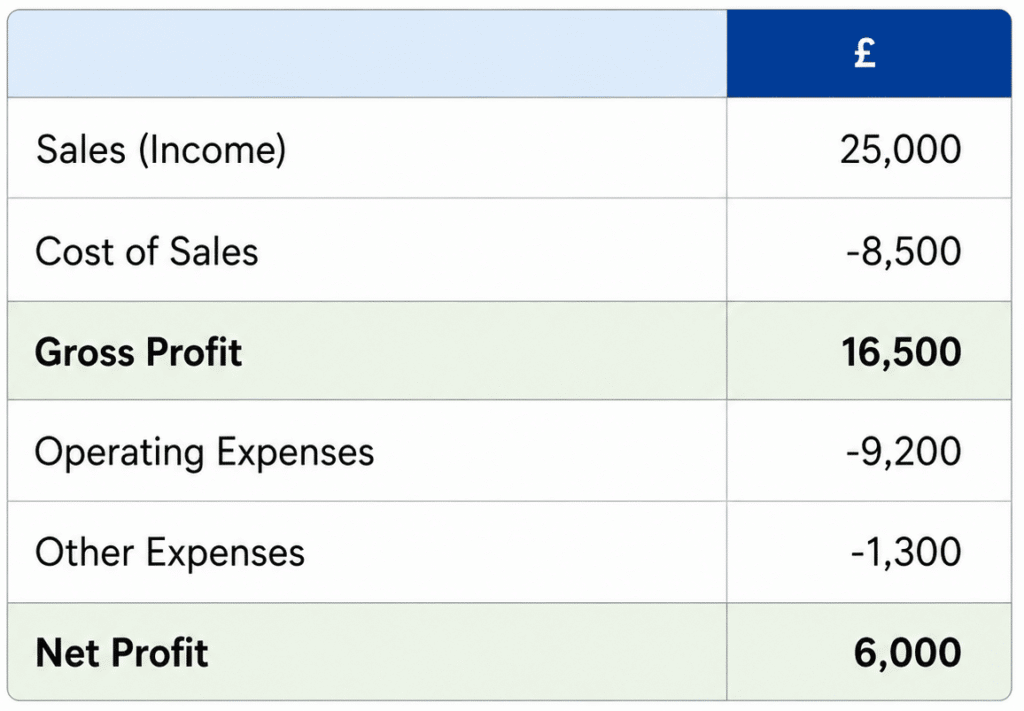
Shows the income and expenses for a period and whether the business made a profit or loss.
Balance Sheet
As at 5th April
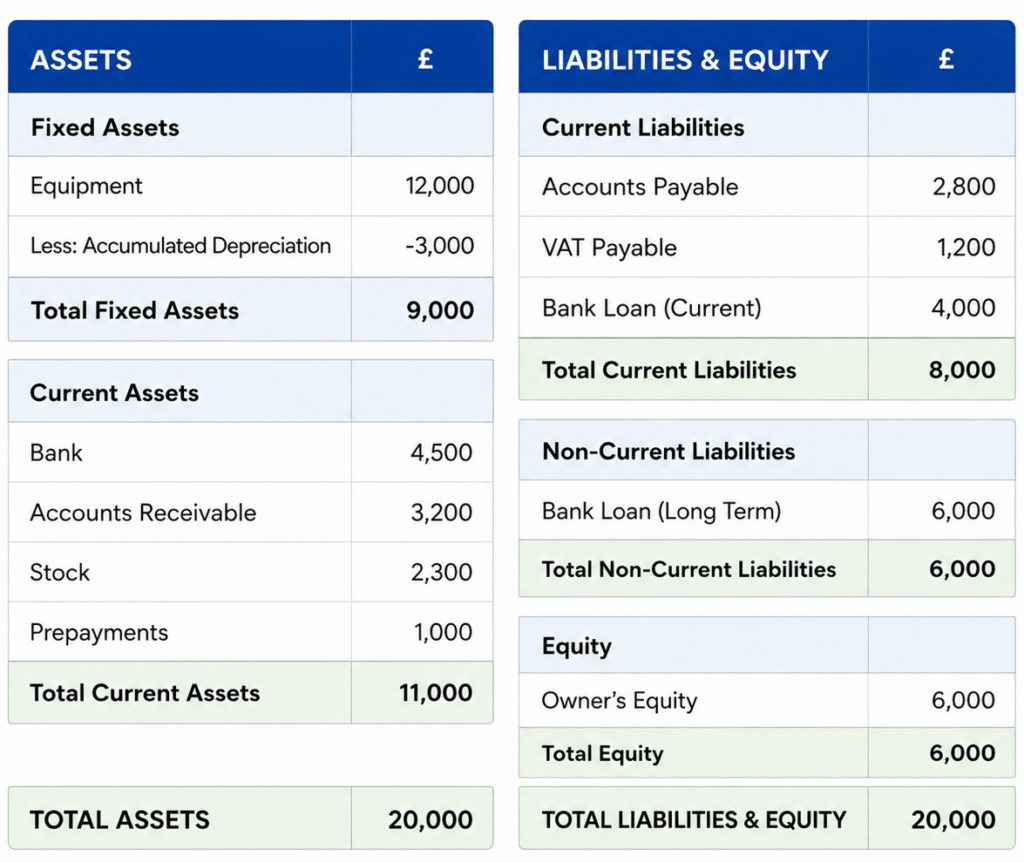
The Balance Sheet shows the assets, liabilities and equity of a business at a specific date.
Trial Balance
As at 5th April
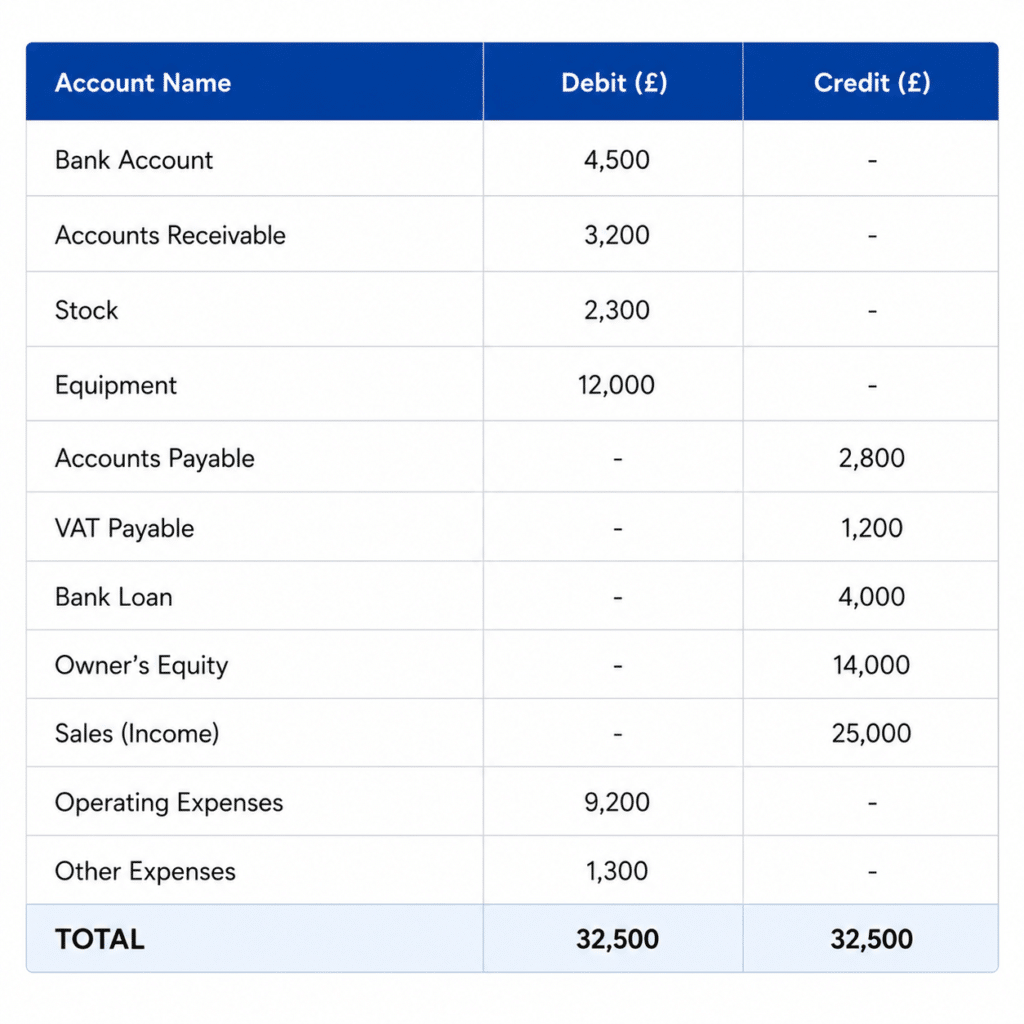
The Trial Balance lists the balances from the general ledger. In a double-entry bookkeeping system, the total debits should equal the total credits.
Cash Flow Statement
For the year ended 5th April
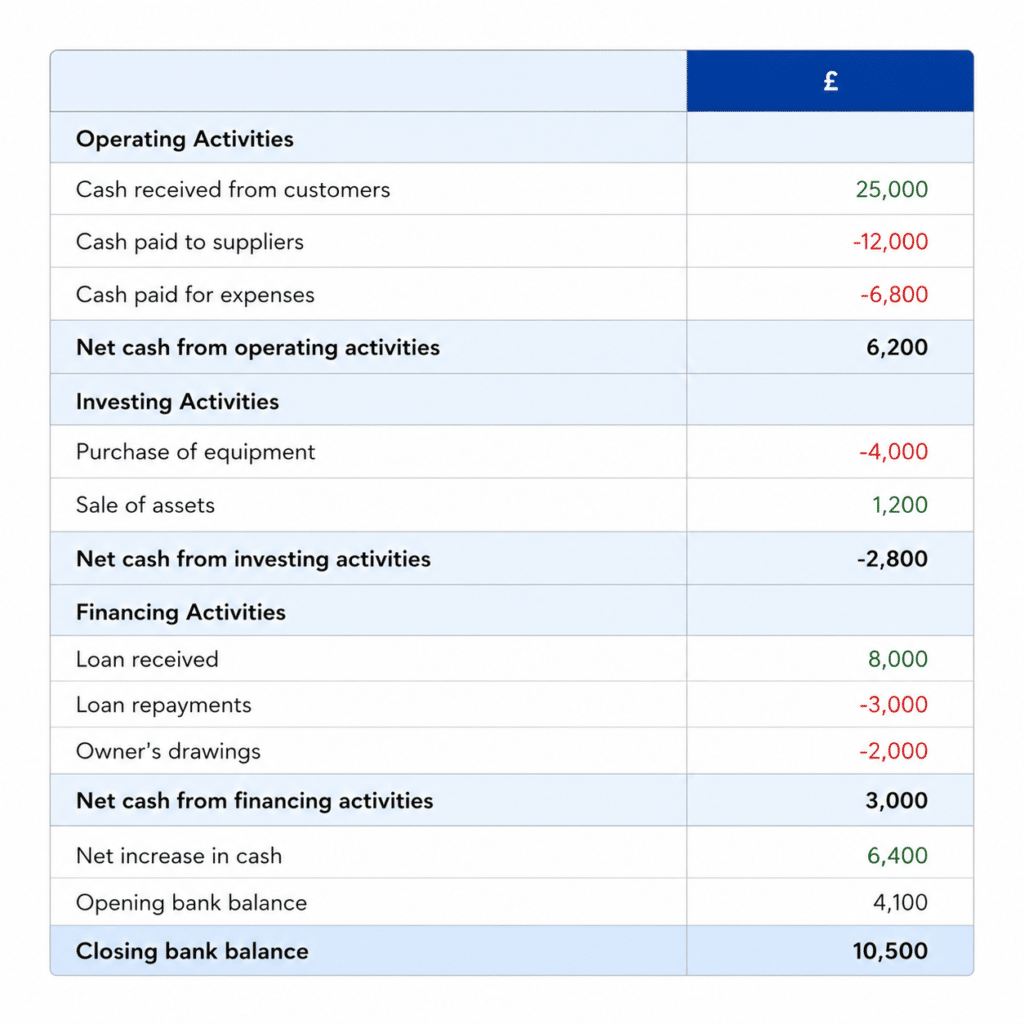
The Cash Flow Statement shows how cash moved into and out of the business during a period.
Tip: Review your bookkeeping reports throughout the year. Regular checks can help you identify overdue customers, rising expenses and potential cash flow problems.
How to Do Your Bookkeeping
You can manage your bookkeeping with a spreadsheet or accounting software. The best option depends on the number and complexity of your transactions and the features you need.
Excel Bookkeeping
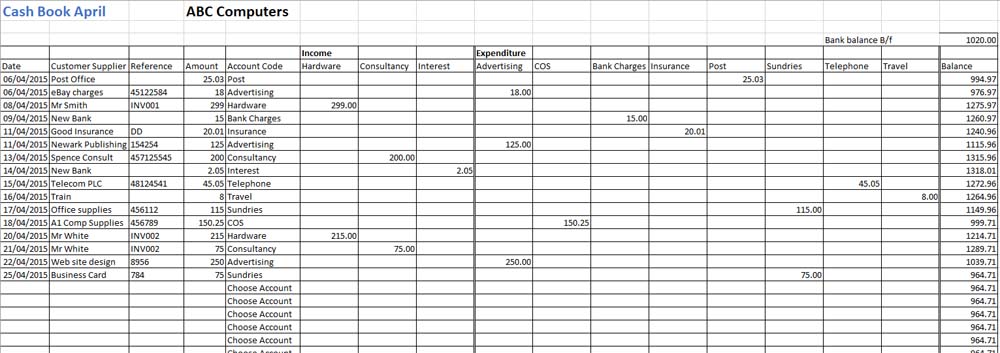
An Excel cash book can work well for sole traders and small businesses with straightforward bookkeeping needs. You can use it to record income and expenses without paying for an accounting software subscription.
Our free Excel bookkeeping templates include cash books, invoices, mileage logs, profit and loss templates and other spreadsheets for managing business records.
Excel may suit your business if you:
- have a small number of transactions
- have simple bookkeeping needs
- want to manage the records yourself
- don’t need features such as automatic bank feeds
- prefer not to pay a monthly software subscription
Bookkeeping Software
Cloud accounting software can reduce manual bookkeeping by automating some everyday tasks.
Depending on the software and plan, features may include:
- automatic bank feeds
- invoice creation
- expense tracking
- bank reconciliation
- VAT calculations and returns
- financial reports
- Making Tax Digital (MTD) support
Popular options for small businesses include Xero, QuickBooks and Sage. Most accounting software uses double entry bookkeeping, while the software handles many of the underlying entries automatically.

Which Option Is Best?
Excel may provide everything you need if you have simple bookkeeping records and don’t need automation. Accounting software may suit you better if you have more transactions, need to submit VAT or MTD information, or want features such as bank feeds and invoicing.
Whichever method you choose, update your bookkeeping regularly. Regular updates make it easier to reconcile the bank, follow up on unpaid invoices and correct mistakes while the transactions are still fresh.
Tip: Set aside time each week or month for your bookkeeping, depending on the number of transactions you have. A regular routine prevents paperwork from building up and makes it easier to keep your records complete.
Common Bookkeeping Basics Mistakes
Small bookkeeping errors can cause problems when you reconcile the bank, prepare accounts or complete a tax return. Here are some common mistakes to avoid.
1. Mixing Business and Personal Finances
Using the same bank account for business and personal transactions makes bookkeeping harder because you need to separate them before completing your records.
Using a separate business account makes it easier to identify business income and expenses.
2. Falling Behind with Bookkeeping
Leaving several months of bookkeeping until later increases the chance of missing transactions, receipts or expenses.
Update your records regularly so you can deal with missing information while the transactions are still recent.
3. Not Keeping Supporting Documents
Keep invoices, receipts and other source documents that support your business transactions.
Organise your documents as you receive them so you can find them when preparing accounts or if HMRC asks to see your records.
4. Not Reconciling the Bank
A bank reconciliation compares your bookkeeping records with your bank statement.
Reconcile regularly to find missing transactions, duplicate entries and other differences that need correcting.
5. Recording Business Expenses Incorrectly
Make sure you record your business expenses correctly and keep the supporting documents. Not every expense qualifies for tax relief, and the rules vary depending on the type of expense and business.
Our guide to allowable business expenses explains what self-employed businesses can claim.
6. Not Reviewing Your Financial Reports
Don’t wait until you need to complete your accounts or tax return to review your figures.
Check your income, expenses, outstanding invoices and cash position regularly so you know what is happening in the business.
Top Tip: Choose a regular time for your bookkeeping each week or month. Keeping on top of a small number of transactions takes less time than catching up several months at once.
Free Bookkeeping Checklist PDF
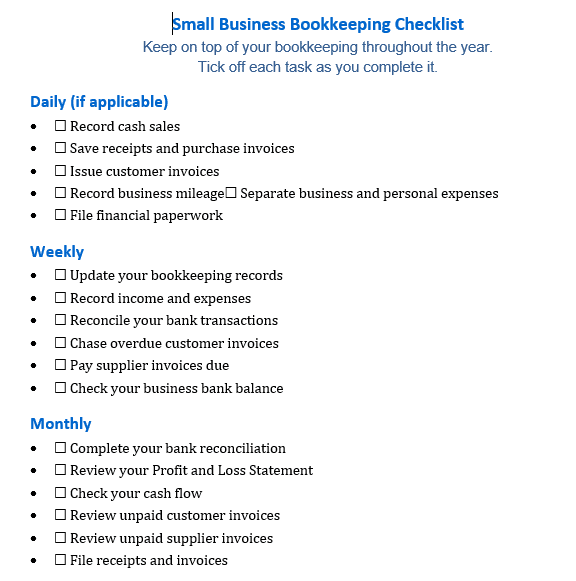
Download our free Bookkeeping PDF Checklist for Small Businesses to keep track of your bookkeeping throughout the year.
The checklist covers tasks to complete:
- daily
- weekly
- monthly
- quarterly
- at year-end
Use it to plan your bookkeeping routine, keep your records up to date and avoid having several months of transactions to complete before a tax deadline.

Frequently Asked Questions
Can I do my own bookkeeping?
Yes. Many sole traders and small business owners manage their own bookkeeping using a spreadsheet or accounting software. You may choose to use a bookkeeper or accountant if you don’t have time to maintain the records or your bookkeeping becomes more complex.
How often should I update my business bookkeeping?
How often you need to update your bookkeeping depends on the number of transactions your business has. For many small businesses, weekly bookkeeping works well. Regular updates help you track unpaid invoices, reconcile the bank, and address missing information promptly.
Do I need accounting software for bookkeeping?
Not always. A spreadsheet may suit a small business with simple bookkeeping needs. Accounting software offers additional features such as bank feeds, invoicing, VAT returns and financial reports.
If you need to follow Making Tax Digital rules, check that the system you use meets the relevant digital record-keeping and submission requirements.
What is the difference between bookkeeping and accounting?
Bookkeeping records and organises financial transactions, while accounting uses those records to prepare accounts, tax returns and financial reports and to analyse the finances of a business.
Read our complete guide to bookkeeping vs accounting
How long should I keep bookkeeping records?
The period depends on your business structure and the type of tax involved. For example, self-employed businesses generally need to keep their Self Assessment records for at least five years after the 31 January submission deadline for the relevant tax year, while limited companies generally need to keep accounting records for six years from the end of the financial year they relate to.
Bookkeeping Basics Summary
Bookkeeping records the financial transactions of your business and provides the information you need for accounts, tax returns and financial reports.
You can manage simple bookkeeping with an Excel spreadsheet or use accounting software to automate tasks such as bank feeds, invoicing and reconciliation. Whichever method you choose, update your records regularly and check them against your bank account.
If you need more help, explore our free bookkeeping templates, bookkeeping guides and accounting software reviews.
Related Articles
Accounting basics
General ledger
Chart of accounts
Double entry bookkeeping
Single entry bookkeeping
Debits and credits
Excel bookkeeping templates
