

Depreciation Schedule – Free Template
Calculate depreciation over several years with our free Excel depreciation schedule template.
A depreciation schedule shows how the value of a fixed asset reduces over its useful life. It records the original cost, depreciation charged each year, accumulated depreciation and the asset’s remaining book value.

Our free Excel depreciation schedule template makes it easy to keep track of your business assets and calculate depreciation over several years. This guide explains how a depreciation schedule works, what information to include and how to use the template for your small business.
What is Straight-line depreciation?
Straight-line depreciation is the most common way of spreading an asset’s value throughout its life. It reduces the asset equally each year, which is why it is also known as “equally distributed depreciation.”
Disclosure: This content may contain affiliate links, which means if you click on them, I may get a commission (without any extra cost to you).
This type of depreciation is simple and easy to understand, making it a popular choice for businesses.

Depreciation Reducing Balance Method
Straight-line depreciation depreciates assets evenly throughout their useful life; the other main method is the reducing balance method.
Reducing balance depreciation is a method that accelerates the depreciation in the early years when the asset is new and has the highest value. This provides a greater deduction in the first few years. An example is a car; in the early years, it depreciates faster than in the later years.
What is a Depreciation Schedule?
A depreciation schedule is a table that shows the depreciation expense for an asset over its useful life. The depreciation schedule records the depreciation expense on the income statement and calculates the asset’s net book value at the end of each accounting period.
Our Excel spreadsheet lets you track and calculate depreciation for up to 25 assets using the straight-line method. It is the most common method of spreading the asset’s value throughout its life.
If you have purchased fixed assets part of the way through the year, you can enter the number of months you want the item depreciated during the first year, and it will calculate the figures for you.
If you haven’t already, we suggest you read our fixed assets and depreciation accounting sections before downloading the template.
To calculate reducing balance depreciation, our free calculator will complete the task for you.
Alternatives to Excel Spreadsheet
Using accounting software, such as QuickBooks or Xero, can greatly simplify the process of recording fixed assets and calculating depreciation. These programs allow for easy organisation and tracking of fixed assets, including purchase dates, costs, and useful lives.

They have built-in features that automatically calculate depreciation using various methods, such as straight-line or declining balance. This not only saves time but also reduces the likelihood of human error in manual calculations.
These software programs generate financial reports that accurately reflect the current value of fixed assets and their corresponding depreciation. This information is crucial for making strategic decisions regarding asset management and budgeting for future expenses.
Excel Depreciation Schedule Instructions
Our free Excel depreciation template is simple to use and will help keep track of depreciation for the useful life of the asset.
- In the green box, enter the current year in the format yyyy, 2024 is entered, but if it is a later or earlier year, change it.
- Enter the description of the fixed asset; for a larger company, you may also want to include the asset number or location
- For the year purchased, enter the year that your accounts finish. E.g your financial year runs from 6th April 2023 to 5th April 2024. If an asset is purchased in June 2023, enter 2024, as the accounting year is 23/24.
- Record the purchase price of the item; if the business is VAT registered, it is the Net value; otherwise, record the full cost
- Enter the asset’s salvage value; this is the amount you expect to get back when you sell the asset at the end of its useful life.
- Enter the asset’s useful life you wish to depreciate the asset for, e.g., a computer over three years, furniture over five years
- If you purchase an item part of the way through the year, enter the number of months during the first year you need to depreciate it for. e.g. items purchased in January and year-end March, you would enter three months
When all the information is posted, the figures will calculate the annual depreciation amount for each year; this can then be entered into the business accounts.
The template runs for ten years, and the final column will show the figure for the remaining depreciation to carry forward. You will then need to record it in a new spreadsheet.
If you do not have Excel, the spreadsheet will also work with Google Sheets and some of the free versions of Office in the Microsoft Store.
Fixed Asset Depreciation Schedule Example
Our example below shows three assets that were purchased in 2020. They are all depreciated using the straight-line method. The computer and printer are depreciated over 3 years, and the desk over 5 years.
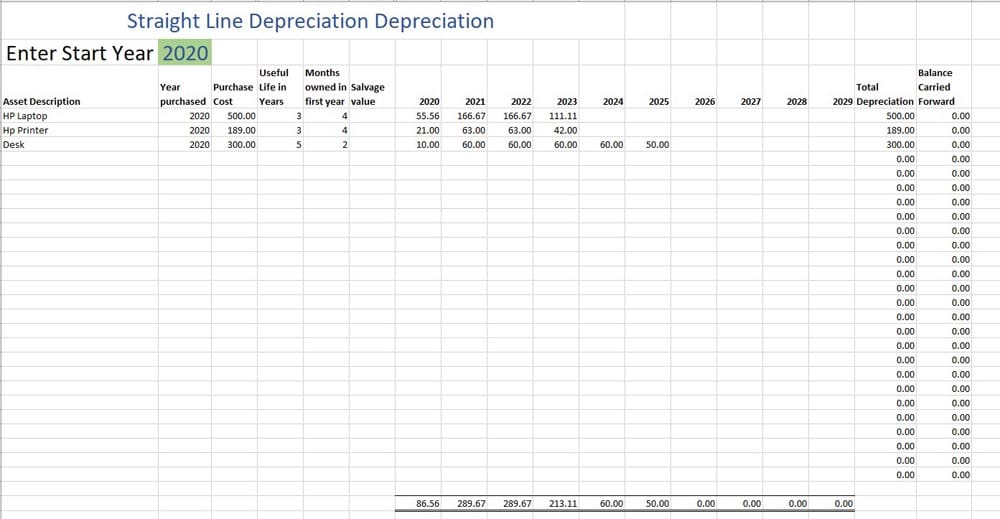
The amounts to post to the accounts are as follows:
- 2020 – 86.56
- 2021 – 289.67
- 2022 – 289.67
- 2023 – 213.11
- 2024 – 50.00
The process of double entry posting involves recording the depreciation expense by debiting it in the profit and loss account, which reflects the cost of wear and tear on assets over time.
The double entry is a credit to the accumulated depreciation account in the balance sheet, which tracks the total depreciation amount that has been recorded against an asset since its acquisition. This accounting method ensures the financial statements accurately represent the decreased value of assets.
How to Calculate the Cumulative Depreciation
If you need to calculate the cumulative depreciation for assets, this can be achieved by adding together the depreciation value of an asset over the years it has been depreciated.
Example of Cumulative Depreciation
Using the depreciation schedule example above, the first item shows depreciation in the first 2 years of 55.56 and 166.67; the total depreciation is, therefore, 222.23.
Free Fixed Asset Register
We also offer a free fixed asset register, which includes further details on the asset’s location and serial numbers.
Licence Agreement
By downloading the Depreciation schedule template, you agree to our licence agreement, allowing you to use the templates for your own personal or business use only. You may not share, distribute, or resell the templates to anyone else in any way. You will also receive an occasional newsletter with bookkeeping updates, useful information, free resources and offers.

Depreciation Template FAQ
Depreciation Schedule – Conclusion
A depreciation schedule provides a clear record of how an asset’s value reduces over time. Using a spreadsheet makes the calculations easier and shows the annual depreciation and accumulated depreciation in one place.
Download our free Excel depreciation schedule template to calculate the figures for your own business assets.
