QuickBooks vs Xero UK: Accounting Software Comparison 2026
Two names often come up when choosing the right cloud-based accounting software: QuickBooks and Xero. Both are designed to be user-friendly, especially for new users who may not have prior experience with financial tools. But which is better for your small business? In this article, we’ll put QuickBooks vs Xero head-to-head, comparing their features, costs, support and user experience to help you make an informed decision.

Our Free QuickBooks vs Xero PDF comparison is available at the end of the page.
Key Takeaways
- QuickBooks Online offers more features at a lower price, including unlimited invoicing, mileage tracking and payroll.
- Xero is a strong competitor with unlimited user access, appealing to larger businesses prioritising collaboration. However, some features may come at an extra cost.
- Xero introduced new business plans and pricing structures on 12 September 2024. Part of the pricing structure may require businesses to upgrade to a higher plan for features they are already using.
Accounting Software Best Deals
XERO – 80% Discount for 6 Months – Cloud accounting, unlimited users, bank feeds, MTD compatible

QuickBooks – 90% off for 7 Months – Sole-Traders, easy to use, MTD-compatible

Tide – Free with Tide Bank Account – All your banking and accounts in one place, MTD compatible
Overview of QuickBooks and Xero
QuickBooks is a significant player in accounting software. Created by Intuit, it quickly became a favourite among small to medium-sized businesses for its user-friendly design and comprehensive features at a low price. QuickBooks also offers specific support services and integrations for UK customers, such as support for all major UK-based banks and Making Tax Digital software.
Disclosure: This content may contain affiliate links, which means if you click on them, I may get a commission (without any extra cost to you).
QuickBooks aims to simplify financial management, making it accessible even for those new to accounting. Its interface, pricing and capabilities have made it a go-to solution for businesses looking to streamline their finances.

Xero, launched in 2006, is a cloud-based accounting solution primarily designed for small business owners. Its flexible access and collaboration features stand out, which enhance the user experience through smooth integration and easy accessibility.
Xero and QuickBooks Online target similar users but offer unique features and experiences that we’ll explore in detail.

Essential Accounting Features Comparison
Knowing the key features of QuickBooks and Xero helps you make an informed decision. Both platforms offer cloud-based accounting software with robust tools to manage various aspects of business finance, but they also have advantages. Multi-currency support is a crucial feature for businesses involved in international trade, and both Xero and QuickBooks offer this functionality.
This section covers three critical areas: Invoicing and Billing, Expense Tracking, and Reporting and Analytics.
Sales Invoicing
Invoicing and billing are essential for any accounting software. QuickBooks stands out with its unlimited invoices, which are ideal for growing businesses with a high volume of transactions. To create invoices, QuickBooks offers a selection of built-in templates that allow you to easily customise the design, colour, and font and even add your business logo.
Xero’s Ignite plan limits users to 20 invoices per month, but it offers invoice templates and more customisation by downloading and using Microsoft Word to make changes. Additionally, Xero users can send invoices directly to each other, enhancing the invoicing process.
Both Xero and QuickBooks have strong invoicing features. QuickBooks’ unlimited invoicing is better if you handle a lot of invoices. However, if customisation and branding are more important, Xero’s flexible templates could be more appealing.
Expense Management and Mileage Tracking
Expense tracking is another feature that both QuickBooks and Xero perform well. QuickBooks includes expense and mileage tracking features across all its plans, making it easier for users to manage their expenses seamlessly. The QuickBooks app allows users to capture receipts, making expense tracking easier.
Xero also offers expense tracking capabilities. However, this is only available with the Grow plan, which costs £33 for one person and £2.50 per month for additional users.
Both platforms enable users to manage expenses effectively, but QuickBooks plans offer a lower starting cost for tracking expenses.
Financial Reports and Analytics
Both QuickBooks Online and Xero provide robust reporting and analytics tools. They both allow you to save customisable reports and have a vast selection of reports for all business needs. Reports can be exported as PDFS and Excel files. Additionally, both Xero and QuickBooks provide tools that simplify accounting processes, making financial management more efficient.
While comparing the reporting section, I found that QuickBooks Online has more reports as standard, while most are available on Xero. You need to change the grouping within a report. For example, a list of sales invoices by customer is available by default in QuickBooks, but in Xero, you select Accounts Receivable and then group by customer.
Overall, QuickBooks and Xero have similar reporting features.
User Experience and Interface
User experience and interface design play crucial roles in the effectiveness of accounting software. While QuickBooks and Xero prioritise user-friendly designs, they aim to make life easier for users by simplifying the bookkeeping process. Ultimately, the user’s preference for the software will depend on personal preference.
To get a complete idea of the user experience, take advantage of the free trial or available discounts.
Mobile App Functionality
Mobile app functionality is increasingly essential for businesses that require on-the-go financial management. QuickBooks Online and Xero offer mobile apps that enable users to manage their finances from anywhere.
QuickBooks and Xero mobile apps offer invoicing on the go, receipt capture, bank reconciliation, and a summary of your business finances. Users can easily reconcile bank transactions using the mobile apps of both Xero and QuickBooks Online. The best choice will depend on the user interface and pricing plan.
Calculating Taxes
QuickBooks and Xero offer features that simplify compliance and make tax time less stressful for UK small businesses.
For self-employed people, QuickBooks Online offers tax calculations for self-assessment, VAT, and CIS in one convenient place, meaning you will always know how much you owe. It will provide the figures you need for self-employment. QuickBooks is particularly cost-effective for sole traders who need to manage VAT, Income Tax, and Self Assessment.
Xero has VAT and CIS, but CIS is an additional £5 per month. If you use a Xero-certified bookkeeper or accountant, they will easily create your self-assessment figures with their software.
Both Xero and QuickBooks work hard to comply with Making Tax Digital and are among the first to update their software to reflect the new changes. The newest is MTD for self-assessment, which will start in April 2026 for income over £50,000.
Payroll
Running a payroll system or outsourcing payroll is crucial if you need to pay employees. This is one area where QuickBooks Online plans are more cost-effective. Their payroll starts from just £1 per month, with the Simple Start plan priced at £16 per month. Payroll makes QuickBooks an attractive option for businesses looking to manage payroll efficiently without breaking the bank.
Xero offers payroll from its Grow plan at £33 per month for one person and Comprehensive at £47 per month for up to 5 people. For 10 people or more, the Ultimate plan is available for £59, with an additional £1 per month per employee over 10, up to a maximum of 200. Xero Payroll offers advanced features, such as allowing employees to request holidays and view payslips through the app.
Additional Features
When choosing the best accounting package for your small business, evaluating all the essential features is crucial. Both Xero and QuickBooks offer many third-party integrations, enhancing their functionality and connectivity. These features might include inventory management, point-of-sale integration, bill payment within the software, time tracking, and project tracking.
These features will ensure you select a software package that meets your current needs and supports future growth.
Pricing Plans and Costs

Pricing is a critical factor; both QuickBooks and Xero offer multiple pricing plans, each with unique features.
This section examines the pricing structures of both platforms and discusses the total cost of ownership.
QuickBooks Online Pricing
QuickBooks Online offers several pricing plans, starting at £10 per month for the Sole Trader plan and £16 for Simple Start. With our 90% discount for seven months, prices are from £1 to £1.60 for the first 7 months. QuickBooks Online Essentials is designed for service-based businesses, offering features like automated invoicing and expense tracking.
QuickBooks is more cost-effective for self-employed and small businesses with up to 3 users.
Intuit QuickBooks Pricing
Sole Trader
- Making Tax Digital for Income Tax (ITSA)
- Automated Bank Feeds
- Send Invoices and Estimates
- Track Mileage
- Separate Personal Expenses
- Manage Income & Expenses
- Calculate and submit CIS
- Free Onboarding
£1 for 7 months
then
£10/month
Save £63
over 7 months
Simple Start
- Making Tax Digital for Income Tax (ITSA)
- Automated Bank Feeds
- MTD VAT
- Invoices paid instantly
- Manage Income & Expenses
- Telephone Support
- Single User
- Track Mileage
- Estimates & Quotes
- Free Onboarding
£1.60 for 7 months
then
£16/month
Save £100.80
over 7 months
Essentials
- Everything in Simple Start
- Recurring Invoices
- Manage Bills
- Multi-Currency
- 3 Users
- Most Popular
- Cash Flow
- VAT Error Checker
- Track Employee Time
- Free Onboarding
£3.80 for 7 months
then
£38/month
Save £239.40
over 7 months
Plus
- Everything in Essentials
- Manage Stock
- Profitability for each Project
- Set Budgets
- 5 Users
- Free Onboarding
- Purchase Orders
£5.60 for 7 months
then
£56/month
Save £352.80
over 7 months
All prices exclude VAT and were correct at the time of writing – September 2026
Xero Accounting Software Pricing
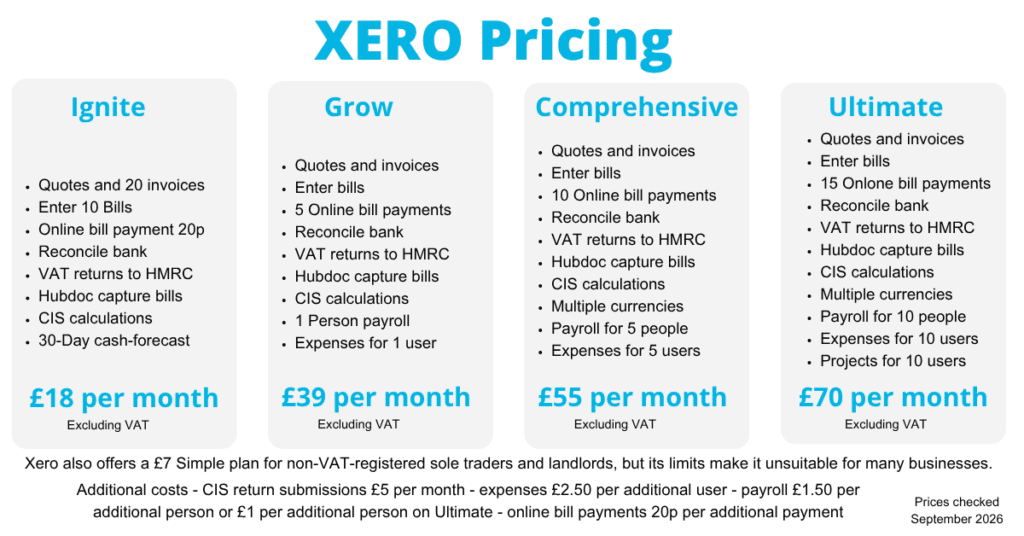
Xero offers various business plans, starting at £16 per month for its Ignite plan. However, the invoicing and billing are limited. With our 80% discount for 6 months, pricing starts from £8 per month for the first 3 months. The starter plan is designed for sole traders and startups, providing limited features at a lower cost.

Xero’s most popular plan is the Grow, which costs £33. This plan is recommended for larger and growing businesses, allowing more users per plan.
Total Cost of Ownership
The total cost of ownership is a factor when selecting accounting software. Due to different pricing structures and additional features, businesses’ total costs may vary significantly based on their choice between QuickBooks and Xero.
QuickBooks may provide better value in the long run due to the comprehensive feature set included in its plans. Xero might be a better option for larger or growing businesses that require unlimited users.
Businesses must consider their needs and usage to determine the most cost-effective option.
Integrations and Add-Ons
Integrations and add-ons can significantly enhance the functionality of accounting software. Both QuickBooks and Xero support numerous third-party applications, allowing users to extend the capabilities of their chosen platform.
App Integrations
QuickBooks Online supports integration with more than 750 different applications. These include platforms like QuickBooks Time, which streamline invoice management and time tracking. With such extensive integration options, businesses can customise their software to meet their needs.
Xero connects with over 1,000 applications, offering greater flexibility for integration. With such an extensive app system, Xero has become a powerful tool for businesses, allowing them to enhance their accounting capabilities with additional features.

Customer Support and Resources
Customer support and resources are vital aspects of any options. QuickBooks and Xero offer various support channels and educational materials to assist users.
User Onboarding
If you are a new user of QuickBooks Online, they offer a free 45-minute onboarding session that provides guidance and support during the initial setup process. This session is particularly beneficial for new users who need guidance during the initial setup process. They also offer resources, including guides, webinars, a support hub, and videos.
Xero provides onboarding resources, including webinars, guides, and videos, to help you set up the software at your own pace.
Support Channels
QuickBooks Online offers phone support from Monday to Friday, 8:00 a.m. to 7:00 p.m. They also provide a live chat service, available Monday through Friday from 8 a.m. to 10 p.m. and on weekends from 8 a.m. to 6 p.m. You can also ask the community for help.
In contrast, Xero does not offer dedicated phone support but provides 24/7 online support via its support articles and allows customers to raise cases through Xero Central. You can also request a call back from them.
Learning Resources
Both QuickBooks and Xero offer a variety of educational materials to help users get the most out of their accounting tools. QuickBooks provides a wealth of training resources designed to enhance user proficiency. These include:
- Webinars: Live sessions covering various features and best practices.
- Tutorials: Step-by-step guides to help you navigate the software.
- Community Forums: A space to ask questions and share experiences with other users.
These resources make it easier for users to understand and use QuickBooks and Xero effectively.
Can I Change My Accounting Software?
Yes, you can change. While it may seem daunting, it’s feasible with careful planning and the right tools. Tools are available to change from Xero to QuickBooks or another product.
Check out the software platform you wish to move to and the migration tools it offers. Some can even move two years’ worth of records for you. Remember that you will lose access to the data when you cancel a subscription.
Accounting Software Best Deals
XERO – 80% Discount for 6 Months – Cloud accounting, unlimited users, bank feeds, MTD compatible
QuickBooks – 90% off for 7 Months – Sole-Traders, easy to use, MTD-compatible
Tide – Free with Tide Bank Account – All your banking and accounts in one place, MTD compatible
QuickBooks vs Xero UK Summary
QuickBooks Online and Xero have strengths and weaknesses, but both offer advanced accounting features. Xero supports an unlimited number of users, making it a good choice for larger businesses. With its pricing plans and unlimited invoices, QuickBooks is ideal for small businesses and the self-employed, offering more features at more affordable prices.
Both QuickBooks and Xero cater to the unique financial needs of UK businesses, particularly in light of evolving tax regulations.
When writing customer reviews on TrustPilot, favour QuickBooks Online, which scores 4.6 and has over 14,000 reviews; Xero only scores 3.7 with over 7,000 reviews. Most negative Xero reviews are for the new invoicing layout, while others like it.
Consider using Xero for larger teams, while QuickBooks Online may be suitable for smaller businesses with fewer users or self-employed individuals.
It is worth consulting your accountant for their recommendations. Ultimately, the choice between QuickBooks and Xero depends on your business needs and priorities.
By carefully considering the key features, pricing, user experience, integrations, and customer support, you can make an informed decision that best suits your business.

QuickBooks vs Xero PDF
Still unsure which cloud-based accounting software is right for your UK small business? We’ve created a handy PDF guide to simplify your decision-making process.


Frequently Asked Questions
When will Xero’s new business plans be available?
Xero’s new business plans will be available starting 12 September 2024. They will move existing users to the latest plan and notify them in advance about the change.
Are VAT charges included in the pricing?
The pricing for both QuickBooks and Xero’s plans does not include VAT charges. Therefore, you should factor in VAT when considering the total cost.
What are the Other Options?
While QuickBooks and Xero are popular in the UK, there are others worth considering, including:
- Sage – Ideal for complex accounting needs
- FreeAgent – Free for some bank account holders
- FreshBooks – Ideal for small businesses