

Best Self-Employed Accounting Software for UK Sole Traders
Compare paid and free accounting software for sole traders and freelancers, including prices, MTD for Income Tax support, VAT features and important plan limitations.
Choosing the best self-employed accounting software is not simply a matter of finding the cheapest plan. The right choice depends on whether you are VAT registered, need to comply with Making Tax Digital for Income Tax Self Assessment (ITSA), send many invoices or want your accountant to access your records.
This guide compares some of the best accounting software for self-employed UK sole traders and freelancers. It includes free and paid options from Sage, QuickBooks, Xero, FreeAgent, Clear Books, Zoho Books and FreshBooks.
We look at everyday bookkeeping features, bank feeds, receipt capture, invoicing, tax support and the normal price after any introductory offer. We also explain the important limitations so you can choose software that suits your business now and in the future.
Disclosure: This content may contain affiliate links, which means if you click on them, I may get a commission (without any extra cost to you).
Best Accounting Software for Self-Employed: Quick Answer
No single package suits every self-employed business. The best choice depends on whether you are VAT registered, need Making Tax Digital for ITSA, want a free plan or require additional features as your business grows.
- Sage Sole Trader Free: Best free option for non-VAT sole traders.
- QuickBooks Sole Trader Plus: Best dedicated paid sole-trader plan.
- Xero: Best for VAT-registered and growing businesses.
- FreeAgent: Best for tax features and qualifying bank customers.
- Clear Books: Best free MTD-focused option.
- Zoho Books: Best low-cost general accounting option.
- FreshBooks: Best for service-based freelancers and time tracking.
Cloud Accounting Software
Cloud accounting software stores your bookkeeping records securely online rather than on one computer. You can access your business finances through a web browser or mobile app, while the provider manages software updates, backups and security.
All the accounting packages in this guide are cloud-based. This makes it easier to connect automatic bank feeds, photograph receipts, send invoices and give your accountant or bookkeeper access. Your records remain up to date without installing new versions of the software.
Cloud software is also well suited to Making Tax Digital because providers can update their systems when HMRC requirements change. Compatible packages can send VAT returns, quarterly Income Tax updates and year-end information directly to HMRC.
You will need a reliable internet connection, and paid plans normally charge a monthly subscription. Before choosing, check the provider’s security, support, data-export options and what happens to your records if you cancel.
Self-Employed Accounting Software Comparison
The table compares the entry-level plan most suitable for self-employed individuals. Prices exclude VAT and show the normal monthly cost before introductory discounts. Some features depend on the plan selected, so check the VAT and MTD requirements carefully before signing up.
| Software | Best for | Normal price from | MTD for Income Tax | VAT returns | Main limitation |
|---|---|---|---|---|---|
| Sage Sole Trader | Non-VAT sole traders wanting a free option | Free; paid plan £7 | Yes | No | Free plan allows five sales invoices and one bank account |
| QuickBooks Sole Trader Plus | Non-VAT sole traders wanting a dedicated accounting app | £10 | Yes | No | VAT requires QuickBooks Simple Start or above |
| Xero Ignite | VAT-registered or growing sole traders | £18 | Yes | Yes | Limited to 20 invoices and 10 bills each month |
| FreeAgent | Sole traders wanting strong tax and Self Assessment tax return features | Free with NatWest, RBS, Ulster Bank or Mettle; otherwise £19 | Yes | Yes | Normal subscription is relatively expensive without a qualifying bank account |
| Clear Books | Sole traders wanting free MTD software | Free; paid plan £5 | Yes | No | Bank feeds, receipt capture and invoicing require a paid plan |
| Zoho Books | Freelancers wanting free or low-cost accounting software | Free; paid plans from £12 | Yes | Yes | Free plan limited to 1,000 invoices and 1,000 expenses each year |
| FreshBooks Lite | Service-based freelancers with a small number of clients | £16 | No | Yes | Limited to five clients and does not support MTD for Income Tax |
Prices and features can change. Always check the provider’s current plan details and the price payable after any introductory offer.
How We Assessed Sole Trader Accounting Software
This comparison draws on my experience as an AAT-licensed bookkeeper, including working with accounting software for clients and testing several of the packages covered. I have also checked the latest plan information provided by each software company.
We assessed each option using the features that matter most to self-employed people:
- Ease of recording income and expenses
- Invoicing, receipt capture and automated bank feeds
- Bank reconciliation and financial reporting
- VAT, CIS and MTD for Income Tax support
- Access for an accountant or bookkeeper
- Free-plan restrictions and the normal price after introductory offers
- Customer support and the ability to move to a larger plan
Not every accounting software package has been tested to the same extent, so the comparison also uses current provider information to confirm features, prices and limitations.
Some links on this page are affiliate links, which means we may receive a commission if you sign up. This does not affect how we assess the software or our ability to explain its limitations.
Which Accounting Software Is Right for You?
The best sole trader accounting software depends on how you work, whether you are VAT registered and the features you need. These common situations should help you narrow down the options.
If You Want Free Accounting Software
Zoho Books offers one of the most generous free plans, including invoicing, expense tracking, bank reconciliation and VAT features. However, it is limited to 1,000 invoices and 1,000 expenses each year.
Sage Sole Trader is another good free option for a small, non-VAT-registered business, while Clear Books offers free MTD for Income Tax software. FreeAgent may also be free if you have a qualifying NatWest, RBS, Ulster Bank or Mettle business account.
If You Are VAT Registered
QuickBooks Simple Start and Xero Ignite are strong options for VAT-registered self-employed. Both support digital VAT records and online VAT submissions, although Xero Ignite limits you to 20 invoices and 10 bills each month.

If You Need Making Tax Digital MTD for Income Tax
QuickBooks Sole Trader Plus, Xero, Sage, FreeAgent, Clear Books and Zoho Books all offer MTD for Income Tax features. These include digital record-keeping, quarterly updates and year-end submissions. Before signing up, check that your chosen plan supports every type of income you need to report.
If You Expect Your Business to Grow
Xero is our preferred option for a growing business because it offers more advanced plans, payroll connections, app integrations and support for limited companies. QuickBooks is another strong choice, with plans that let you add VAT, bills, employees, and other features as your business grows.
If You Work in Construction
QuickBooks and Xero both offer useful Construction Industry Scheme features, though the functions included vary by plan. Before choosing a subscription, check whether you need to verify subcontractors, calculate CIS deductions, produce statements, or submit CIS returns.
If You Charge by Time or Project
FreshBooks is particularly well suited to consultants, designers and other service businesses that track billable time and recharge expenses to clients. Its Lite plan is limited to five billable clients, so businesses with a larger customer base may need a more expensive plan.
Our Overall Recommendation
QuickBooks Sole Trader Plus is our first choice for many self-employed people who want a dedicated sole-trader package with MTD for Income Tax support. Choose Xero if you are VAT registered, process a manageable number of invoices and bills, or want software that can support a growing business.
Best Self-Employed Accounting Software Reviews
Our reviews examine the main features, pricing, benefits and limitations of each accounting package. Use them to compare the options and find the best fit for your business.
QuickBooks Sole Trader Plus
QuickBooks Sole Trader Plus is our top choice for many self-employed people. It is designed for non-VAT-registered sole traders who want to manage their bookkeeping, prepare for Self Assessment and meet the requirements of MTD for Income Tax.
The software connects to your bank account and helps separate business and personal transactions. You can record income and expenses, send invoices, photograph receipts, track mileage, and produce financial reports. It also supports CIS record-keeping for subcontractors.
QuickBooks Sole Trader Plus is HMRC-recognised for MTD for Income Tax. It helps maintain digital records and prepare the information needed for quarterly updates and the year-end tax return. You can also give your accountant access without using the account’s single-user allowance.

The main limitation is that the plan does not support VAT returns. If you are VAT registered or expect to register soon, QuickBooks Simple Start is the better option. Payroll, supplier bill management and some more advanced accounting features also require a higher plan.
QuickBooks Sole Trader Plus costs £10 per month, excluding VAT. New customers can use our exclusive offer to receive 90% off for seven months.
Best for: Non-VAT-registered sole traders who want an easy-to-use accounting package with invoicing, expense tracking and MTD for Income Tax support.
Sage Sole Trader – Best Free Option
Sage Sole Trader is designed for self-employed people who are not VAT registered. It includes a free plan for basic bookkeeping and a paid plan for those who need fewer restrictions and more automation.
The free plan lets you record income and expenses, connect one bank account, and send up to five sales invoices each month. It also includes a mobile app, an Income Tax Self Assessment summary and 25 automatically categorised transactions.

![Best Self-Employed Accounting Software for [year]](data:image/gif;base64,R0lGODdhAQABAPAAAMPDwwAAACwAAAAAAQABAAACAkQBADs=)
Both plans support MTD for Income Tax, including digital record keeping, quarterly updates and the year-end submission. The paid plan costs £7 per month, excluding VAT, and adds unlimited invoicing, multiple bank accounts, receipt scanning, CIS features and unlimited transaction categorisation.
The main limitation is that neither Sage Sole Trader plan supports VAT accounting. VAT-registered businesses need Sage Start or another suitable package.
Best for: Self-employed people with simple bookkeeping needs who want free MTD for Income Tax software from an established UK provider.
Xero – Best for VAT and Growing Businesses

Xero is a good choice for self-employed people who are VAT registered or expect their business to grow. Unlike the dedicated QuickBooks and Sage sole-trader plans, Xero can continue to support the business if its bookkeeping needs become more complex or it later becomes a limited company.
Xero Ignite includes bank feeds and reconciliation, invoicing, a user-friendly interface, supplier bills, receipt capture through Hubdoc and financial reports. It supports MTD for VAT and MTD for Income Tax, allowing eligible users to keep digital records and make the required submissions to HMRC.
The main drawback is the monthly transaction limits. Ignite allows up to 20 invoices and quotes and 10 supplier bills each month. Businesses exceeding either limit will need a more expensive plan.
Xero Ignite costs £18 per month, excluding VAT. Check the banner below for the latest Xero introductory offer.
Best for: VAT-registered self-employed businesses and those wanting accounting software that can support future growth.
FreeAgent – Best Free with a Qualifying Bank Account
FreeAgent provides a broad range of accounting and tax features for self-employed people. It includes invoicing, expenses, bank feeds, estimates, time tracking, project management and cash-flow reporting.
The software supports MTD for VAT and MTD for Income Tax. Self-employed users can submit quarterly updates and their final declaration directly to HMRC. FreeAgent also calculates your expected tax bill and displays upcoming deadlines on its Tax Timeline.
FreeAgent is free with a business bank account with NatWest, Royal Bank of Scotland, or Ulster Bank. It is also free with a Mettle account, provided you make at least one transaction each month.
Without a qualifying bank account, the regular price for a sole trader is £19 per month, excluding VAT. The standard plan includes up to 10 automated receipt and bill captures each month; unlimited Smart Capture costs an additional £5 per month.
FreeAgent also offers a separate plan for landlords. It can record property income and expenses and supports MTD for Income Tax, making it useful for someone with both self-employment and property income.
Best for: Self-employed people who want accounting, tax and project-management tools in one package, particularly those eligible to receive FreeAgent free through their business bank.
ClearBooks – Free MTD for Income Tax Option
ClearBooks offers a free plan designed around the requirements of MTD for Income Tax. It lets self-employed people record income and expenses, submit quarterly updates, and complete the year-end tax return. There are no transaction limits, and you can give your accountant access.
The free plan also includes basic reports and is available to CIS subcontractors. However, it does not provide automated bank feeds, invoicing, or receipt scanning, so you must enter transactions manually.
The paid Sole Trader plan costs £5 per month, excluding VAT. It adds bank feeds, invoice creation, receipt and bill scanning, more detailed reports and accountant tools. VAT-registered businesses need Sole Trader Plus, which costs £15 per month.
ClearBooks also provides free and paid plans for landlords, including those with UK or overseas property income.
Best for: Self-employed people who want free MTD for Income Tax software with no transaction limits and are happy to enter transactions manually.
Zoho Books – Feature-Rich Free Accounting Software
Zoho Books offers one of the most comprehensive free accounting plans for self-employed people. It includes invoicing, expense tracking, bank reconciliation, VAT accounting, receipt management and financial reports.
The software supports MTD for VAT and MTD for Income Tax. This includes digital record-keeping, quarterly updates and the year-end submission, making it suitable for businesses that need to report directly to HMRC.
The free plan is limited to 1,000 invoices and 1,000 expenses each year. This is enough for many small businesses, but those with more transactions will need to upgrade. Zoho Books Standard costs £12 per month, excluding VAT, and adds higher limits and more automation.
Zoho Books also connects with other Zoho applications, including its CRM, expenses and stock-management products. This can be useful if you already use the Zoho business suite, although the number of features may take longer to learn than a simpler package.
Best for: Self-employed people who want a generous free plan with VAT and MTD support for Income Tax.
FreshBooks – Best for Time Tracking and Client Work
FreshBooks is designed for freelancers and service-based businesses that charge by the hour or manage client projects. It includes invoicing, expense tracking, time recording, estimates, online payments and project-management tools.
The Lite plan costs £16 per month, excluding VAT, and is limited to five billable clients. This makes it suitable for someone working with a small number of regular customers, but the cost increases considerably if you need a higher client limit.
Warning: FreshBooks supports MTD for VAT, but it is not currently compatible with MTD for Income Tax. If you are required to follow MTD for Income Tax, choose another package or confirm whether separate bridging software can meet your needs.
FreshBooks is less suitable for businesses that need detailed UK tax features. Still, its invoicing and time-tracking tools may appeal to consultants, designers, and other professionals who bill for their time.
Best for: Service-based businesses that need strong invoicing, project management, and billable time tracking but don’t need MTD for Income Tax software.
Free Accounting Software for Sole Traders
Free accounting software can be suitable for a new or small self-employed business, but the features and limits vary considerably. Before choosing a plan, check whether it includes invoicing, bank feeds, VAT and MTD for ITSA.
Zoho Books provides the broadest range of everyday accounting features on its free plan, including invoicing, expenses, bank reconciliation and VAT. However, it is limited to 1,000 invoices and 1,000 expenses each year.
Sage Sole Trader Free is designed for businesses not registered for VAT. It includes one bank connection, income and expense records, Making Tax Digital for ITSA and up to five sales invoices each month.
Clear Books Sole Trader Free provides MTD for Income Tax submissions with no transaction limits. However, the free plan does not include bank feeds, invoicing or receipt scanning.
FreeAgent offers a more complete accounting package for free if you have a qualifying NatWest, Royal Bank of Scotland, Ulster Bank or Mettle business account. Without an eligible account, you need a subscription.
Free software can reduce costs, but a paid plan may save more time if you need automated bank feeds, unlimited invoicing, receipt capture or additional support.
Making Tax Digital for Income Tax Self Assessment (ITSA)
Making Tax Digital for Income Tax changes how self-employed people and landlords keep records and report their income to HMRC. Those affected must use compatible software to maintain digital records, send quarterly updates and submit their tax return.
Making Tax Digital for Income Tax applies in stages:
- From 6 April 2026: qualifying income over £50,000
- From 6 April 2027: qualifying income over £30,000
- From 6 April 2028: qualifying income over £20,000
Qualifying income is your gross income from self-employment and property combined, before expenses. HMRC uses information from an earlier Self Assessment return to decide when you must join, but you are still responsible for checking.
HMRC does not recommend one particular accounting package. It provides a software finder listing compatible products. Before choosing, check that the software supports all your income sources, including separate businesses and any UK or overseas property income.
QuickBooks, Xero, Sage, FreeAgent, Clear Books and Zoho Books offer MTD for Income Tax options. FreshBooks currently supports MTD for VAT but not MTD for Income Tax.
Features to Check Before Choosing
Accounting software providers often advertise similar features, but the limits and costs can vary between plans. Check the following before signing up:
- MTD for Income Tax: Confirm that the accounting software can keep digital records, submit quarterly updates and complete your tax return. It should also support every income source you need to report.
- VAT: If you are VAT registered, check that your plan supports your VAT scheme and can submit returns directly to HMRC.
- Bank feeds: Connecting your bank account reduces manual entry, but some free plans exclude this feature or limit the number of accounts.
- Invoicing: Check for limits on the number of invoices, customers, or quotes you can create each month.
- Bills and expenses: Check whether you can record supplier bills, scan receipts and attach documents to transactions.
- Reporting: Useful reports include profit and loss, balance sheet, cash flow and estimated tax.
- Accountant access: Some plans include separate access for your accountant or bookkeeper without using the main user allowance.
- CIS and payroll: Construction businesses and employers may need a higher plan or paid add-on for these features.
- Plan limits: Review restrictions on transactions, bank accounts, users, clients and receipt captures.
- Support and ease of use: A free trial lets you test the mobile app, navigation, and customer support before committing.
Can You Use Excel Instead?
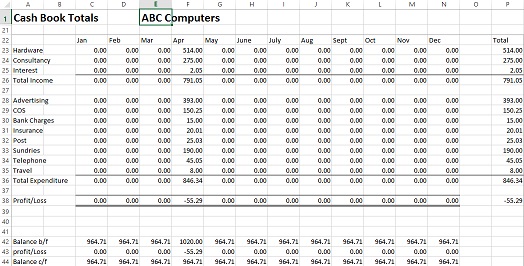
Excel can still suit a small self-employed business with a low number of transactions. A well-designed bookkeeping spreadsheet can record income and expenses, calculate profit and provide the figures needed for a Self Assessment tax return.
If MTD for Income Tax applies to you, a spreadsheet cannot submit information directly to HMRC. You will need compatible bridging software to send quarterly updates and submit your tax return. Our free MTD spreadsheet template for Income Tax is designed for sole traders who want to keep their digital records in Excel and prepare the cumulative figures needed for each quarterly update.
Excel is inexpensive and flexible, but it requires more manual data entry. It does not automatically import bank transactions, scan receipts, send payment reminders or alert you to bookkeeping errors. Accounting software is usually the better option if you have regular transactions, are VAT registered, or want to reduce the time you spend maintaining your records.
Our free self-employed bookkeeping template suits businesses that want a simple Excel cash book for recording income and expenses. If you need to use Making Tax Digital for Income Tax, use our MTD spreadsheet template instead.
Frequently Asked Questions
Self-Employed Accounting Software Summary
QuickBooks Sole Trader Plus is our top choice for many non-VAT-registered self-employed people, while Xero suits VAT-registered and growing businesses better.
Sage, Zoho Books and Clear Books provide free options, although their features and limits differ. FreeAgent may also be free with a qualifying business bank account.
Before signing up, check that the chosen plan supports VAT, MTD for Income Tax and all your income sources. Also review any limits on invoices, bills, bank accounts and receipt capture. A free trial can help you decide whether the software suits the way you manage your business.
Related Pages
Self-Employed bookkeeping
Self-Employed allowable expenses
Bookkeeping templates for Self-employed
Free Excel bookkeeping templates

